Schedule a call with our expert web design and answer engine optimization team today to discuss how we can improve search visibility and upscale your brand's online presence in just 30 days.
Discover the essential checklist for local voice search optimization. Learn how to target conversational keywords, optimize your Google Business Profile, implement schema markup, and manage reviews to capture more local customers through voice assistants.
Article Summary
Why is local voice search optimization important?
46% of all voice searches have local intent, making it crucial for businesses to optimize for local queries to capture nearby customers.
What’s the first step in voice search optimization?
Start with conversational keyword research—focus on long-tail, question-based phrases that match how people speak.
How does Google Business Profile impact voice search?
An accurate, complete, and regularly updated Google Business Profile increases your chances of being recommended by voice assistants.
Why is schema markup essential?
Schema markup helps search engines understand your business details, FAQs, and reviews, improving your chances of being featured in voice results.
What technical factors matter most?
Mobile-first design, fast page speed, and responsive layouts are critical for ranking in voice search results.
Voice search is transforming how people find local businesses. By 2025, 75% of U.S. households will use voice assistants like Siri, Alexa, or Google Assistant. This means optimizing your local SEO for voice search is no longer optional - it’s essential for staying visible to potential customers.
Here’s a quick rundown of what you need to do:
Claim and optimize your Google Business Profile: Ensure your business name, address, phone number (NAP), and hours are accurate and consistent across platforms.
Focus on conversational and local keywords: Target natural, question-based phrases like “Where’s the best coffee near me?” while including location-specific details.
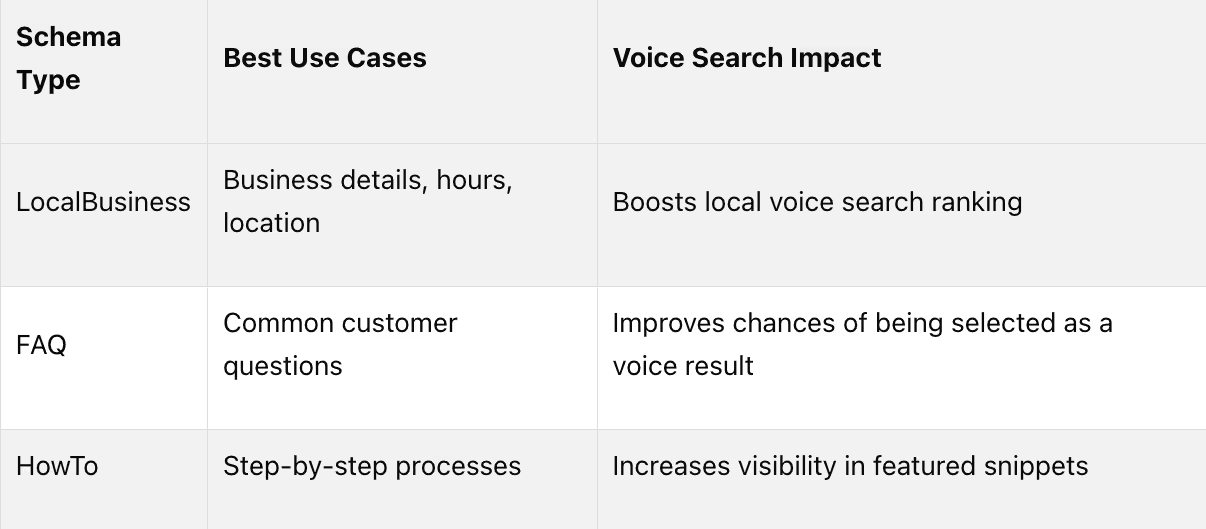
Leverage structured data (schema markup): Use LocalBusiness, FAQ, and HowTo schema to help voice assistants understand your business information better.
Encourage customer reviews: Businesses with 4+ star ratings and recent reviews rank higher in voice search results.
Create content for voice intent: Write clear, conversational answers to common questions, and aim for featured snippets.
Track and refine your strategy: Use tools like Google Search Console and analytics to monitor performance and adjust as needed.
Voice search prioritizes quick, accurate, and locally relevant answers. By following these steps, you can position your business to meet the growing demand for voice-first searches.
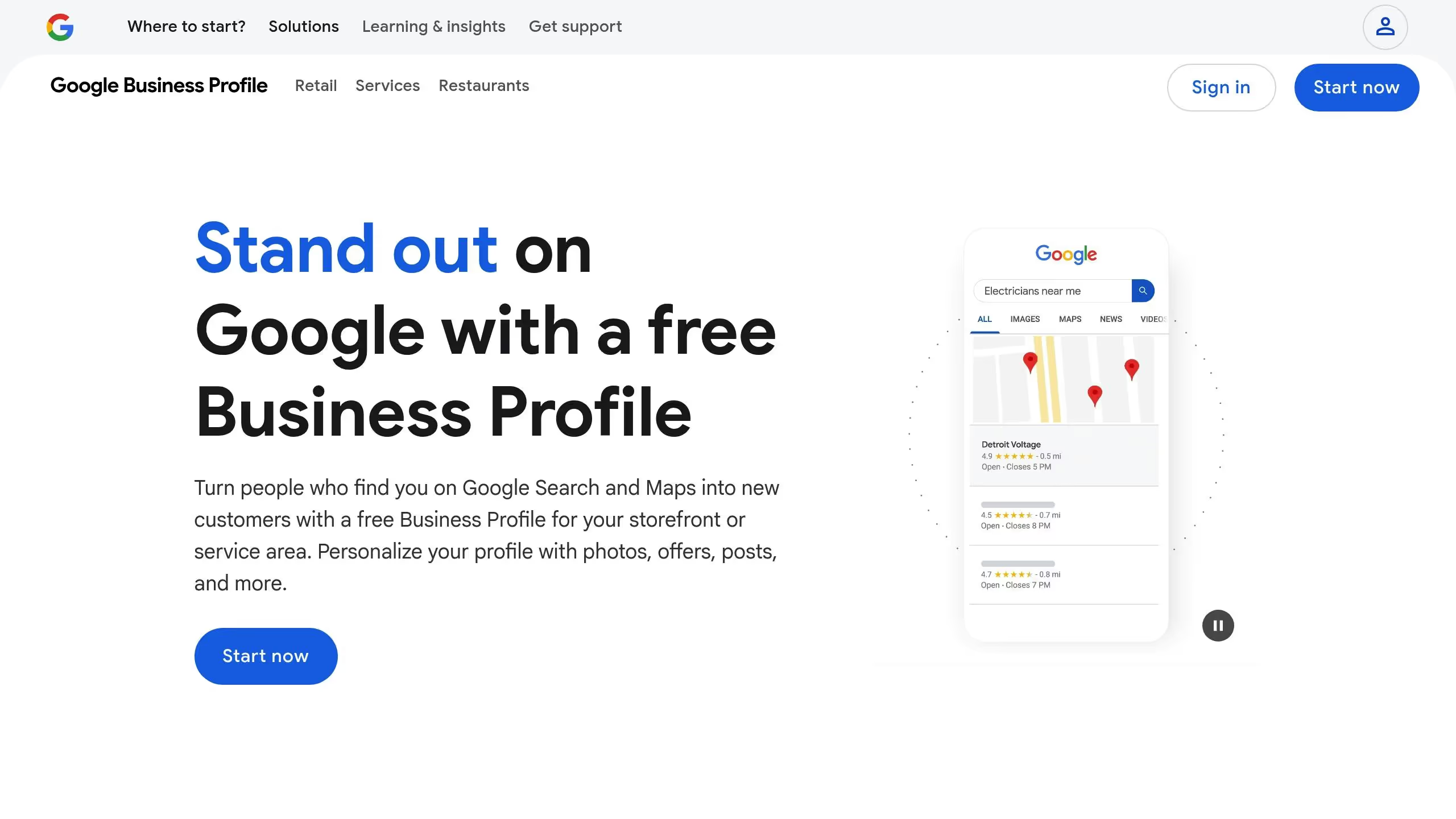
Your Google Business Profile is the backbone of your visibility in voice search. When someone asks their phone, "Where’s the nearest coffee shop?" or "What time does the pharmacy close?" voice assistants pull this information directly from business profiles and local directories. Nailing this step is the difference between being found or completely overlooked by voice search users.
Claim and Verify Your Google Business Profile
Start by claiming and verifying your Google Business Profile. Voice assistants prioritize verified profiles when answering local questions. If your profile is incomplete or unverified, it may not even show up in voice search results[1][2].
To claim your profile, search for your business on Google. If it appears, click the "Own this business?" link to claim it. If it doesn’t, create a new profile through the Google Business Profile Manager. Verification can be done via mail, phone, or email. Once verified, make sure to fill out every section, including:
Business name
Address
Phone number (e.g., (555) 123-4567)
Website
Operating hours
Specific categories (e.g., "Mexican Restaurant" instead of just "Restaurant")
Add high-quality photos of your storefront, interior, and products or services. While voice assistants don’t directly use images, profiles with photos tend to rank better in local search results. Update your profile immediately if any details change[1][6].
Once your profile is set up, ensure that all the information matches across every local directory.
Keep Information Consistent Across Local Directories
Consistency is key. Mismatched information confuses voice assistants and can hurt your rankings. Your Name, Address, and Phone Number (NAP) must be identical across platforms like Google, Yelp, Bing Places, and Apple Maps[1][2][7].
Keep a master record of your official NAP details and stick to consistent formatting (e.g., "Avenue" vs. "Ave."). Even small discrepancies, like varying phone number formats, can signal inconsistency to search engines.
It’s a good idea to audit your listings every three months or whenever you make changes, like moving to a new location or rebranding. Search for your business on major platforms and manually verify the information. If you have multiple locations, consider using listing management tools to sync your details across directories, but don’t skip manual checks[1][7].
Also, don’t overlook industry-specific directories. For example, restaurants should be listed on platforms like TripAdvisor and OpenTable, while a law firm might focus on Avvo or FindLaw. Wherever your business appears, the NAP details should match exactly.
Consistency lays the groundwork for positive reviews, which are critical for voice search rankings.
Manage Customer Reviews
Customer reviews play a big role in voice search visibility, especially for searches like "best pizza place near me" or "top-rated salon."
Make it easy for happy customers to leave reviews. Send follow-up emails with a direct link to your Google Business Profile, or ask for reviews in person when customers seem satisfied.
Respond to all reviews - positive and negative. Thank customers for good feedback, and address complaints professionally. This shows search engines that you’re engaged with your online presence, which can boost your rankings[2].
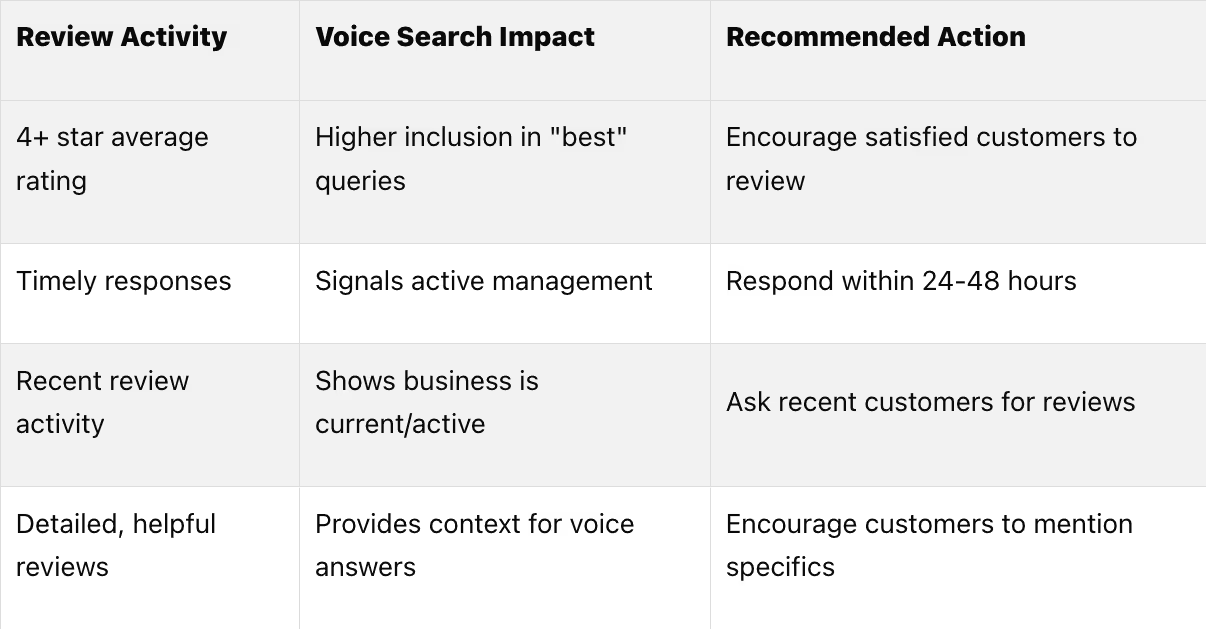
Here’s how reviews impact voice search performance:
Monitor your online reputation regularly. Set up Google Alerts to catch mentions of your business across the web. Highlight positive reviews as social proof on your website and social media, but avoid incentivizing reviews in ways that break platform rules.
Voice search users often rely on reviews to make quick decisions. Businesses with recent, positive reviews that mention specific products or services are more likely to be recommended by voice assistants.
Step 2: Use Conversational and Local Keywords
Voice search has reshaped the way people discover local businesses. Instead of typing keywords, users now ask questions like, "Where can I find the best deep-dish pizza near me?" This shift calls for a new approach to keywords - one that combines a conversational tone with local context.
The stats back this up: 58% of consumers have used voice search to find local business information in the past year[8][9]. If you're not optimizing for conversational keywords, you're missing out on a major opportunity to stay competitive. Pairing conversational keywords with local strategies can significantly boost your visibility.
Find Conversational Keywords
Voice search queries mimic real conversations. Instead of short phrases, people use complete questions like, "What time does the hardware store close on Sundays?" or "Where's the nearest 24-hour pharmacy?" Your content should reflect this natural, spoken language.
Start by paying attention to your customers. Look at the questions they ask in service inquiries, Google Business Profile Q&A sections, and online reviews. These can provide valuable insights into the language they naturally use.
Google Search Console is another great tool for uncovering conversational keywords. Focus on long-tail queries and question-based searches that begin with words like "what", "where", "when", "how", and "why." These align perfectly with how users interact with voice assistants.
You can also use tools like Answer the Public to identify common questions about your industry and location. For instance, if you run a dental practice in Austin, you might find that people are searching for, "What dentist takes walk-ins in Austin?" or "How much does teeth cleaning cost in Texas?" These specific queries can guide your keyword strategy.
Instead of cramming keywords into your content, structure it naturally - like an FAQ. For example, address a question such as, "Can I get emergency dental care in Austin on weekends?" This approach resonates with both users and search engines.
Add Location-Specific Phrases
Voice search is heavily focused on local intent. In fact, 46% of all voice search users look for a local business daily[9]. And they’re not just searching for generic terms like "coffee shop" - they’re getting specific with phrases like "coffee shops near Zilker Park" or "best espresso in the French Quarter."
To match this level of specificity, your content needs to reflect hyper-local details. Mention your city, but don’t stop there. Include neighborhood names, nearby landmarks, and even popular attractions. For example, a restaurant in Brooklyn could reference areas like "Brooklyn Heights", "DUMBO", or "near the Brooklyn Bridge."
Consider creating dedicated pages for different service areas. A plumbing company might have pages titled "Emergency Plumber in Manhattan", "Bathroom Renovation in Queens", and "Water Heater Repair near Central Park." Each page should use natural, conversational language while weaving in these location-specific terms.
Don’t overlook seasonal or event-based keywords. For instance, a flower shop might optimize for phrases like "Valentine’s Day flowers in downtown Seattle" or "wedding bouquets near Pike Place Market." Similarly, referencing local landmarks - like "Italian restaurant near the Space Needle" or "parking garage close to Fenway Park" - can help your content align with how people search.
Target 'Near Me' Keywords
"Near me" searches have become a cornerstone of local voice search. They’re incredibly convenient, especially for users on the go. Think about a driver asking, "Find a gas station near me."
To capture this audience, integrate "near me" phrases naturally into your content and meta descriptions. For example, a mechanic could include FAQs like, "Looking for auto repair near me? Our certified mechanics are located just off Highway 101 in San Jose."
Your homepage should also feature "near me" variations that match common searches for your services. A veterinary clinic might use phrases like "emergency vet near me", "pet vaccinations near me", or "dog grooming near me" in its service descriptions.
Meta descriptions and title tags are prime spots for "near me" keywords. A title like "Best Tacos Near Me - Open Late in Downtown Portland" captures both the conversational tone and local intent of voice searches.
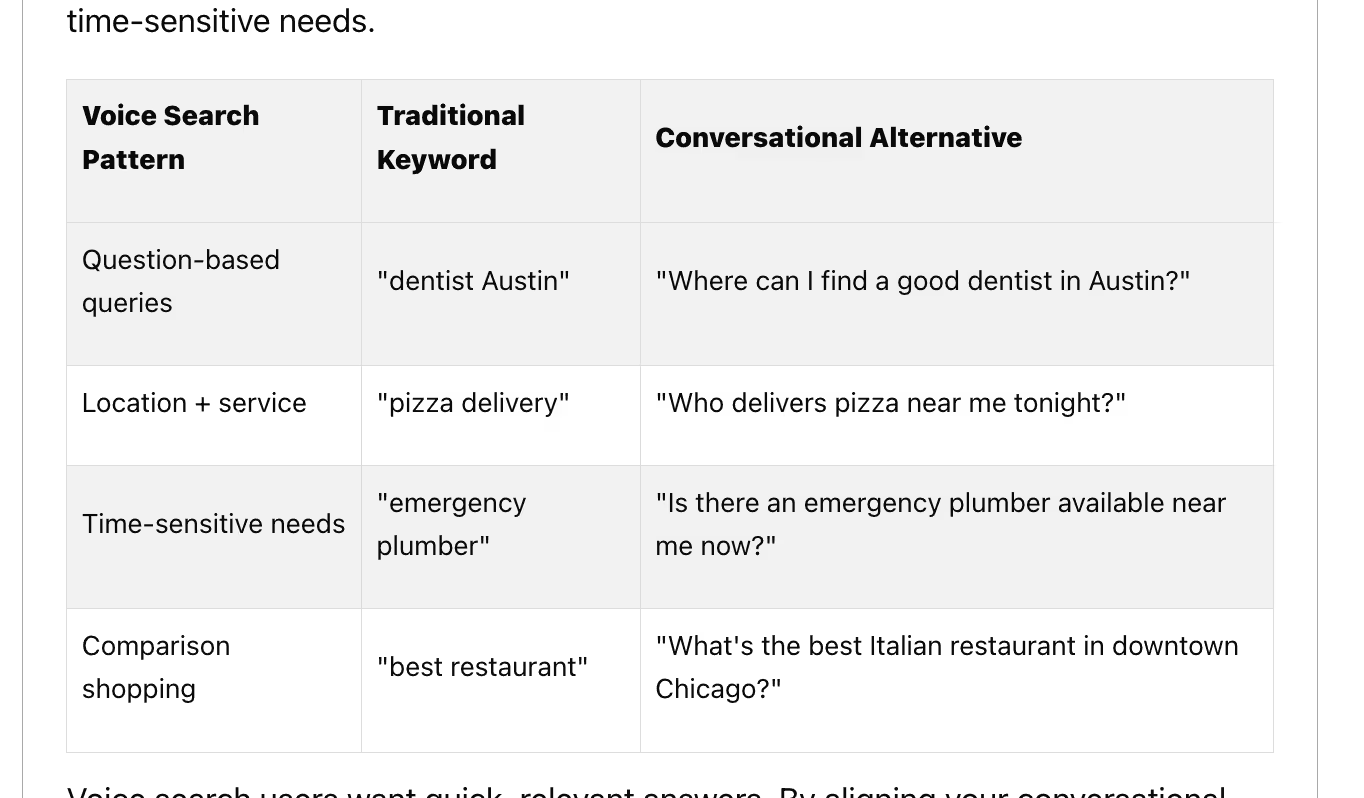
Timing plays a big role, too. Voice searches often include urgency, like "pharmacy open now near me" or "locksmith available tonight near me." If your business offers extended hours or emergency services, make sure your content reflects these time-sensitive needs.
Voice search users want quick, relevant answers. By aligning your conversational keywords with their specific needs and locations, you increase the likelihood of being the top recommendation from a voice assistant.
For more advanced strategies, consider working with Lite Studio's AEO experts[8][3][4].
Step 3: Add Structured Data and Schema Markup
Schema markup is like a bridge between your website and search engines, making it easier for voice assistants to understand your business details - what you offer, where you're located, and even your hours. For example, when someone asks their smart speaker, "What time does the pharmacy close tonight?" the device taps into structured data to provide an instant, accurate answer.
By formatting your website’s information in a way that search engines can easily read, schema markup becomes a key tool for businesses focusing on voice search. In fact, featured snippets powered by schema markup now account for over 40% of voice search results. With projections showing that 75% of US households will own smart devices by 2025, structured data is no longer just helpful - it’s essential for businesses aiming to stay visible in local searches[1][3][4].
Add LocalBusiness Schema
LocalBusiness schema is a format that organizes your business’s core details - like name, address, phone number, hours, and services - so voice assistants can quickly pull this information for voice searches[1][3].
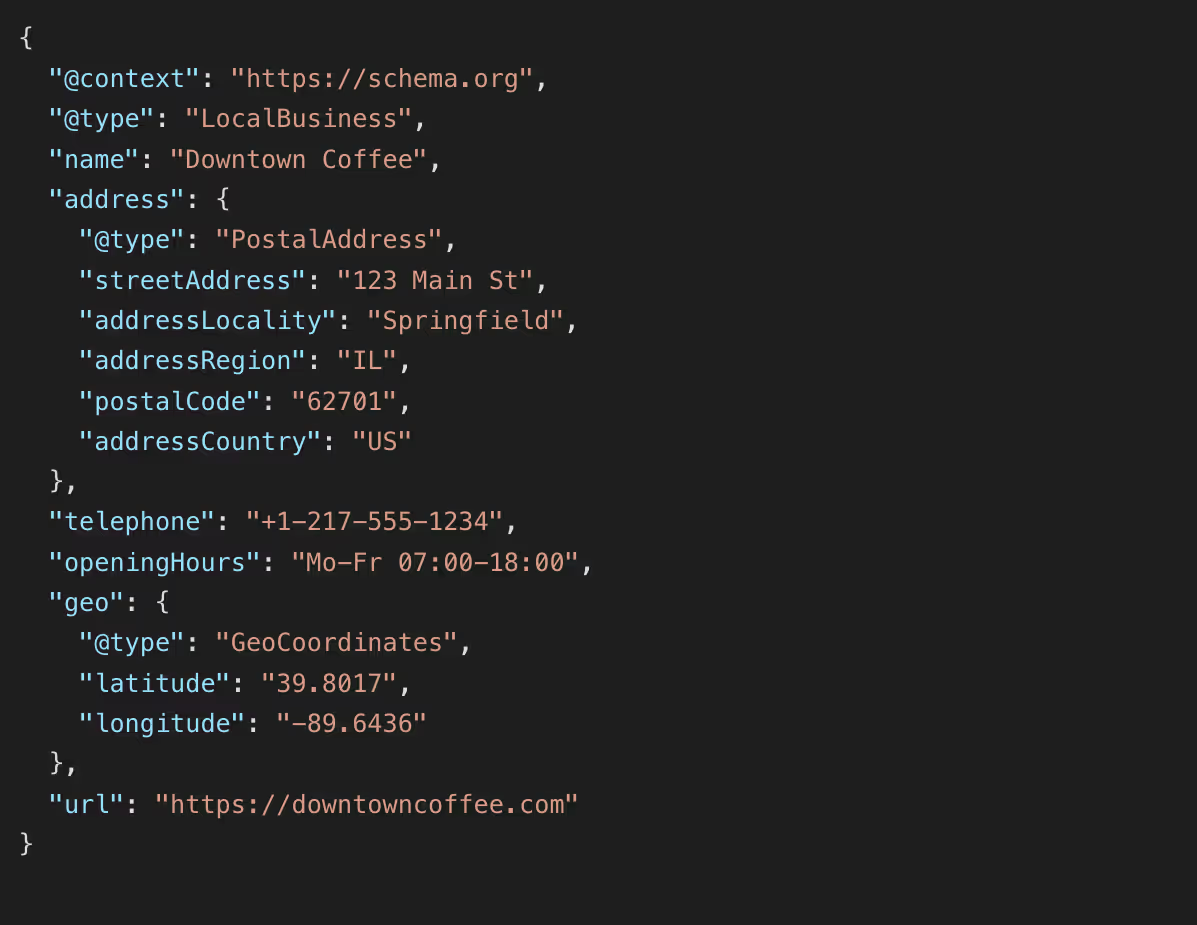
Here’s an example of what a complete LocalBusiness schema might look like for a business in the US:
This example follows US conventions for address formatting, phone numbers, and time, and even includes geo-coordinates. Geo-coordinates are especially useful for queries like "coffee shop near me", as they help voice assistants calculate distances.
Different industries can use schema to highlight specific details. For instance:
Restaurants can include menu links and reservation options.
Medical practices can outline accepted insurance plans and specialties.
Retail stores might focus on product categories or inventory availability.
If coding feels overwhelming, Google's Structured Data Markup Helper is a great starting point. This tool simplifies the process by walking you through each field and generating the necessary code for your website.
In January 2025, a dental clinic in Chicago implemented LocalBusiness and FAQ schema on its website. The result? A 22% increase in voice search-driven appointment bookings over three months. Dr. Emily Tran, who led the project, updated schema details like hours and services and added answers to common patient questions[3].
Beyond the basics, other schema types can further improve your voice search visibility.
Use FAQ and HowTo Schema
FAQ and HowTo schema are particularly effective for voice search because they target the conversational nature of user questions. For example, when users ask, "How do I schedule an appointment?" or "What payment options do you accept?" properly marked-up content increases the likelihood of being selected as the voice response[3][4].
FAQ schema organizes frequently asked questions so search engines can easily extract and display them. Focus on questions with local intent, like "Do you offer same-day service in downtown Portland?"
HowTo schema is ideal for step-by-step guides. A plumbing company, for instance, might use it for content like "How to schedule emergency plumbing service" or "How to prepare for a bathroom renovation consultation."
To identify the best content for these schemas, use tools like Google Search Console to find question-based queries already driving traffic to your site. Your customer service logs and Google Business Profile Q&A section are also goldmines for common questions.
When crafting FAQ answers, keep them concise and to the point. Voice assistants typically read only the first 20-30 words, so start with the most important information. For instance, instead of a long explanation about hours, say, "We're open Monday through Friday, 8:00 AM to 6:00 PM, and Saturday, 9:00 AM to 3:00 PM."
Review Schema Regularly
Once your schema is in place, regular updates are critical to maintaining your visibility in voice search. Search engines and voice assistants evolve constantly, and your business details may change too. A quarterly audit - or updates after major changes like new hours or services - keeps your schema accurate and effective[3].
For example, holiday hours are a common area where businesses fall short. Many voice searches during peak seasons revolve around special schedules, so updating this information is crucial.
Free tools like Google’s Rich Results Test and Schema Markup Validator can help you quickly check for errors and ensure your schema is working as intended. Run these tests after making updates to your website or if you notice a drop in voice search performance.
Stay on the lookout for new schema types that might benefit your business. Google frequently introduces new options, and businesses that adopt them early often gain an edge. For instance, the introduction of health and safety protocol schema during the pandemic became a game-changer for many businesses.
Common issues to watch for include outdated hours, inconsistent contact information, and broken schema code after website updates. Missing or incorrect geo-coordinates can also hurt your visibility, as location accuracy is vital for local searches.
If your business operates multiple locations, each location needs its own LocalBusiness schema with accurate, location-specific details. Without this, voice assistants may struggle to differentiate between locations, potentially hurting your overall visibility.
For businesses looking to stay ahead, partnering with experts like Lite Studio can ensure your schema remains aligned with the latest trends in voice search[3]. They can help you maintain accuracy and maximize your visibility in this growing search space.
Step 4: Create Content for Voice Search Intent
To strengthen your local SEO for voice search, craft content that naturally answers everyday questions with a focus on location. Voice search queries often mimic how people speak. For instance, instead of typing "pizza delivery Chicago", someone might ask their smart speaker, "Where can I get pizza delivered near me tonight?"
Your goal is to create content that directly addresses these types of questions. When voice assistants search for answers, they prioritize clear, concise, and conversational content.
Write Conversational and Clear Content
Think of your content as a conversation with a customer. Use full sentences, skip the industry jargon, and include long-tail, question-based keywords that match the way people talk. For example, instead of targeting "car service Dallas", write content that answers, "Where can I get my car serviced in Dallas?"
To identify the questions your customers are asking, review customer service logs, your Google Business Profile Q&A section, and feedback from your team. Then, structure your content to provide complete and straightforward answers.
For instance, a plumber in Austin could address, "How quickly can a plumber arrive in South Austin?" with: "Our plumbers can usually reach South Austin within 30 minutes of your call."
FAQ sections are particularly effective for voice search because they mirror the question-and-answer format that voice assistants favor. Instead of a generic heading like "Service Hours", use something more specific, such as "What are your weekend hours?" Then answer clearly: "We are open from 8:00 AM to 10:00 PM on Saturdays and Sundays." Keep responses short but thorough, as voice assistants often pull only brief snippets.
This approach not only engages users but also increases your chances of appearing in featured snippets.
Target Featured Snippets
Featured snippets are prime real estate for voice search since voice assistants often pull answers from these highlighted sections at the top of Google results. To improve your chances of landing a snippet, organize your content into clear, concise answers, and use bullet points or numbered lists for step-by-step instructions. Also, structure your headings to reflect likely voice queries.
For example, if you run an auto repair shop, you could answer, "How do I prepare my car for winter?" with a numbered list that starts with the most critical steps.
Different formats work best for different types of questions:
Paragraph snippets are great for definitions, such as "What is brake fluid?"
List snippets work well for processes, like "How do I change my oil?"
Table snippets help with comparisons, such as "What's the difference between synthetic and conventional oil?"
Focus on the questions your local customers ask most often. A dental office, for instance, might answer, "How often should I get my teeth cleaned?" with: "Most dentists recommend professional teeth cleaning every six months for optimal oral health."
Use tools like Google Search Console to track your performance. Look for pages that rank in positions 2–5 for question-based queries, as these are strong candidates for earning a featured snippet.
In 2024, a local law firm in Chicago implemented FAQ schema and created neighborhood-specific landing pages for "divorce lawyer in Lincoln Park." Within just 60 days, they experienced a 22% increase in voice search inquiries and a 15% boost in local pack visibility. Their digital marketing manager used Schema.org tools and speech analytics to refine their content[3].
Building on this success, consider tailoring your content to specific neighborhoods for even better local visibility.
Create Neighborhood-Specific Content
Take your local strategy a step further by developing hyper-focused content for individual neighborhoods. Generic, city-wide content no longer cuts it in today’s voice search environment. People often ask highly specific questions about their immediate surroundings, and search engines prioritize hyper-local content. Instead of one broad page about "Seattle coffee shops", create separate pages for "coffee shops in Capitol Hill", "best coffee in Fremont", or "coffee shops near Pike Place Market."
This approach aligns with the localized nature of voice search. For example, if someone in Brooklyn Heights asks, "What's the best Italian restaurant near me?" they’re looking for recommendations specific to their area.
Start by identifying the neighborhoods or districts within your service area that generate the most interest. Create dedicated pages or blog posts for each, incorporating details like local landmarks, events, and unique community needs. A cleaning service might write about "house cleaning in Riverside", mentioning Riverside Park or seasonal cleaning tips relevant to that area.
Make sure your content feels genuinely local. Avoid simply adding neighborhood names to generic text. Instead, mention nearby businesses, local events, and area-specific details. For example, a fitness studio in Portland could create content about "yoga classes in the Pearl District", highlighting the urban lifestyle, parking options, and how their schedule fits into residents’ routines.
If your business has multiple locations, each one should have its own neighborhood-focused page. For example, a chain restaurant could create unique pages for each location, spotlighting local attractions, partnerships, or community involvement.
For larger businesses, implementing a comprehensive neighborhood content strategy might require expert help. Specialists like Lite Studio can assist in structuring complex, location-specific content to improve user experience and search visibility. Their expertise in answer engine optimization ensures strong performance across both traditional and voice search platforms.
The ultimate goal? Become the go-to resource for your neighborhood. Don’t just answer questions about your business - offer helpful insights about the area. This approach builds trust with both search engines and potential customers, positioning your business as a key part of the local community.
Step 5: Track Results and Improve Your Strategy
Once you've optimized your business profiles, keywords, and structured data, the next step is to ensure these efforts pay off. Tracking results is essential to keep your voice search strategy effective. Voice search optimization isn’t something you can set and forget - it’s a process that requires continual monitoring and fine-tuning.
Monitor Local Pack and Voice Rankings
To gauge how well your voice search strategy is working, tools like Google Search Console and Google Analytics 4 (GA4) are indispensable. In Search Console, focus on the queries driving traffic - especially longer, conversational phrases and "near me" searches, which are often linked to voice users[5].
Although Google doesn’t explicitly label voice queries, you can analyze natural language patterns and mobile traffic in GA4 to identify them. For example, you might notice queries like "where can I get my car fixed in downtown Phoenix" instead of shorter, more traditional keyword searches like "auto repair Phoenix."
For a more detailed look at your local performance, consider platforms such as BrightLocal, Whitespark, or SEMrush[8]. These tools can help you track your visibility in both traditional and voice search results, monitor keyword performance over time, and keep tabs on your local pack rankings.
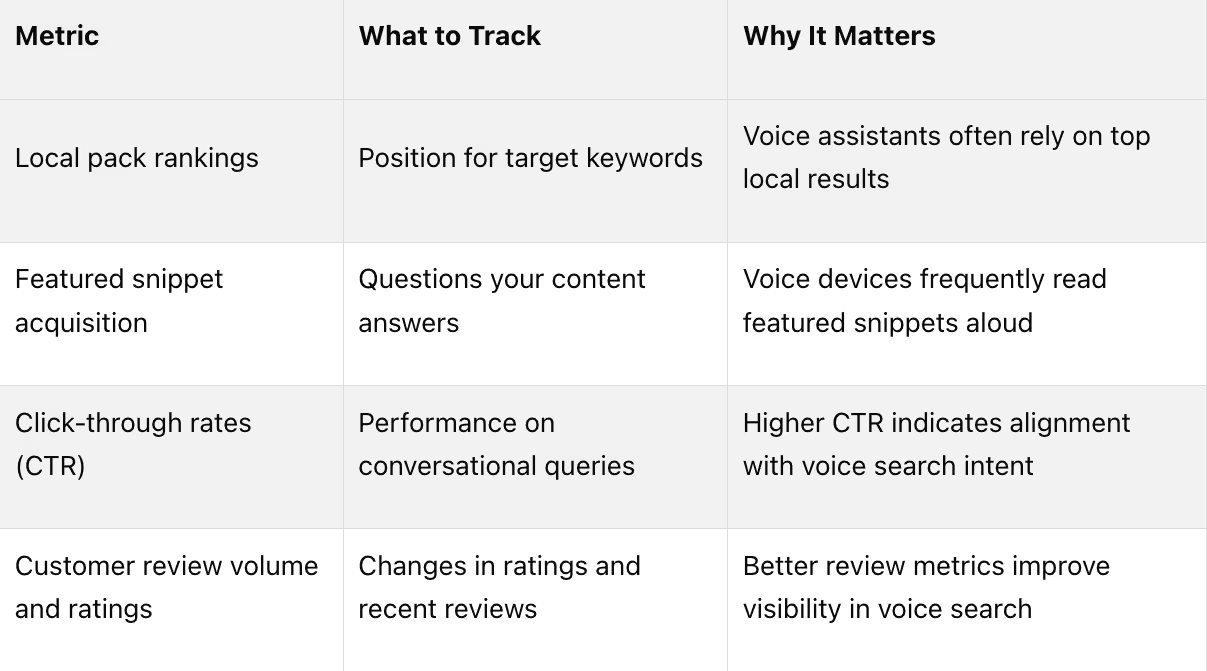
Here are some key metrics to watch when evaluating your voice search performance:
Pro Tip: Google filters voice search results for queries including "best" to show only businesses with ratings of 4 stars or higher[2]. This makes managing your reviews a vital part of your strategy.
A great example of success comes from a multi-location dental practice in Texas. In 2024, they boosted their local voice search visibility by 38% in just three months. By implementing LocalBusiness schema, updating Google Business Profiles, and creating neighborhood-specific FAQ content, they also saw a 22% increase in appointment bookings from voice search queries[3].
To stay ahead, schedule monthly reviews of your rankings and conduct quarterly deep dives into your overall strategy. This approach helps you spot trends early without overreacting to short-term fluctuations.
Review Voice Search Query Data
Once you've assessed your rankings, dive into your query data for deeper insights. In Google Search Console, use the "Performance" section to filter queries that sound conversational or include question words like "how", "where", "when", and "what."
For instance, a restaurant might notice queries such as "best Italian food near downtown Seattle" or "where can I get gluten-free pasta tonight." These patterns reveal the specific questions your customers are asking and the language they use.
Keep a record of emerging trends in voice queries. Note seasonal shifts and new phrases. For example, a fitness studio might see an uptick in "outdoor workout classes" searches during spring and "indoor heated yoga" in winter.
The numbers back this up: 58% of consumers have used voice search to find local business information in the past year, and 76% of smart speaker users perform local searches weekly[1]. This growing trend means your query data is a goldmine for understanding customer behavior.
Use these insights to refine your content. If customers frequently ask about your hours, ensure you have a clear FAQ section. If parking is a common question, add detailed parking information to your Google Business Profile and website. The goal is to answer questions before potential customers look elsewhere.
Also, segment your data by device type and location. Mobile voice searches often have different intents compared to smart speaker queries. Understanding these differences allows you to create more targeted, effective content.
Stay Current with Voice Search Changes
Voice search technology is evolving quickly. By 2025, 75% of U.S. households are expected to own smart devices[3]. This shift will continue to change how people search for local businesses, making it critical to stay informed.
Keep up with updates from platforms like Google, Amazon, and Apple. Changes in algorithms, new device features, and shifts in user behavior can all impact your voice search performance. Subscribe to trusted SEO resources and join professional communities to stay in the loop on the latest developments.
Some recent trends to watch include the rise of hyper-local content targeting specific neighborhoods, advancements in AI that better understand conversational queries and regional accents[8], and the integration of voice search metrics into SEO tools.
Regularly audit your structured data and schema markup - aim for quarterly reviews. Voice search algorithms rely heavily on structured data, and outdated information can hurt your visibility[3].
For larger businesses with complex websites, keeping up with these updates can be a challenge. Specialized services like Lite Studio offer solutions tailored to voice and AI-driven search. They provide advanced tracking, optimize structured data, and design content strategies focused on improving visibility and user engagement.
Conclusion: Keep It Simple and Monitor Progress
Optimizing for voice search in local SEO is a manageable task when you focus on consistency, clarity, and ongoing monitoring. Following these steps can lead to noticeable improvements.
Consistency involves ensuring your business name, address, and phone number (NAP) are identical across all online listings. Search engines depend on this uniformity to verify your business. Even minor inconsistencies can negatively impact your voice search rankings[1][2][7].
Clarity is about creating natural, conversational content that answers common customer questions directly. Instead of awkwardly stuffing keywords into your text, aim for content that feels natural when spoken aloud[1][4][6].
Ongoing monitoring ensures you stay ahead as voice search technology evolves. Regularly reviewing your performance data and updating your information helps maintain visibility. With 75% of U.S. households expected to own smart devices by 2025[3], adapting to changes is critical for long-term success.
These three principles are essential for building a strong voice search strategy. Businesses that excel in this area treat it as a continuous effort rather than a one-time task. Regularly auditing schema markup, checking local pack performance, and responding promptly to customer reviews are all key to maintaining visibility in voice search results[3][5].
For enterprises managing complex websites, professional support can make a big difference. Lite Studio specializes in simplifying content-heavy sites and optimizing them for AI-driven voice search. Their answer engine optimization (AEO) services help businesses streamline their strategies and achieve maximum visibility in voice search results.
FAQs
How can I keep my business information consistent across local directories to improve voice search optimization?
To keep your business information consistent across local directories, make sure your Name, Address, and Phone number (NAP) match exactly on every platform. This includes your website, Google Business Profile, Yelp, and any other local directories where your business appears. Even tiny variations - like using "St." instead of "Street" - can confuse search engines and hurt your visibility.
It’s also important to regularly review your listings to fix any errors and update outdated information, such as changes in holiday hours or a new phone number. Tools or services designed to manage multiple listings can help streamline this process and minimize mistakes. Consistency not only helps search engines trust your business but also ensures voice assistants can provide accurate details to potential customers.
How can I collect and manage customer reviews to boost my business's visibility in voice search results?
Encourage your customers to share their experiences by leaving reviews on Google and other well-known local directories. Make it a habit to respond to all reviews - whether glowing or critical - quickly and professionally. This shows that you genuinely value their feedback and care about their experience. Plus, showcasing positive reviews on your website can help establish trust and strengthen your credibility.
To make managing reviews easier, explore tools designed to help you monitor and respond efficiently. You can also politely ask happy customers to leave a review. Genuine feedback from real customers can play a big role in boosting your business's visibility in voice search results.
How can structured data and schema markup help my business appear in voice search results?
Structured data and schema markup can give your business an edge in voice search results by providing search engines with clear and organized details about your content. This includes essential information like your business name, address, phone number, services you offer, and even customer reviews.
When search engines can easily interpret and access your information, the likelihood of your business being included in voice search answers goes up. This means users get precise and relevant responses, boosting your visibility and helping you connect with potential customers more effectively.
Key Points
How does voice search behavior differ from traditional search, and why does it matter for local SEO?
Local Intent Prevalence: 46% of all voice searches have local intent, meaning users are often looking for nearby businesses, services, or directions.
Longer, Conversational Queries: Voice queries average 29 words and are typically phrased as natural questions, not just keywords.
Mobile Usage: 25% of voice searches occur on mobile devices, making mobile optimization essential.
“Near Me” Growth: “Near me” searches have grown 500% faster than all mobile searches, highlighting the need for local content.
Action-Oriented: Voice users expect immediate, actionable answers—not just a list of links.
What are the most important technical steps for optimizing a website for local voice search?
Mobile-First Design: Ensure your site is fully responsive and provides a seamless experience on all devices.
Page Speed: Optimize for under 3 seconds load time by compressing images, minifying code, and leveraging browser caching.
Schema Markup: Implement LocalBusiness, FAQ, Review, and Speakable schema to help search engines understand your content.
HTTPS Security: Secure your site with SSL certificates to build trust with both users and voice assistants.
Clean Site Architecture: Use logical navigation and clear content hierarchy for better crawlability and user experience.
How should businesses optimize their Google Business Profile for voice search?
Complete and Accurate Information: Fill out all fields—name, address, phone, hours, services, and business description.
Regular Updates: Post new photos, updates, and offers to keep your profile fresh.
Q&A Section: Populate with common customer questions and clear, helpful answers.
Review Management: Encourage and respond to reviews to build trust and improve local rankings.
Service and Product Listings: Add detailed service menus and product catalogs for richer search results.
What role does schema markup play in local voice search optimization?
LocalBusiness Schema: Marks up your business details, making them easily accessible to search engines and voice assistants.
FAQ Schema: Highlights question-and-answer content, increasing the chance of being featured in voice results.
Review Schema: Showcases customer feedback, which voice assistants often reference.
Speakable Schema: Identifies content suitable for voice playback, improving compatibility with voice assistants.
Validation: Regularly test and validate your schema to ensure it’s error-free and up to date.
How can businesses ensure NAP consistency and maximize local directory visibility?
Standardize NAP Data: Use the exact same business name, address, and phone number across all platforms and directories.
Claim Listings: Secure and optimize your presence on Google, Apple Maps, Bing, Yelp, and industry-specific directories.
Regular Audits: Conduct quarterly checks to identify and correct inconsistencies or duplicates.
Citation Management Tools: Use tools to monitor and manage your listings efficiently.
Update Immediately: Make changes as soon as business information changes to avoid confusion.
What metrics and tools should be used to track local voice search optimization success?
Featured Snippet Appearances: Track how often your content is selected for position zero in search results.
Local Pack Rankings: Monitor your visibility in Google’s local pack for key queries.
Voice Search Traffic: Use Google Search Console and Analytics to identify voice-driven queries and traffic.
Review Volume and Ratings: Measure the number and quality of reviews across platforms.
Mobile Performance Scores: Monitor Core Web Vitals and mobile speed using Google PageSpeed Insights.
Directory Consistency: Regularly check NAP consistency and citation health across all listings.
Get Started
Streamline your online presence and captivate users with a refined, single or minimal page experience. Schedule a call with our team today to discuss how we can simplify your site and elevate your brand in just 30 days.