Schedule a call with our expert web design and answer engine optimization team today to discuss how we can improve search visibility and upscale your brand's online presence in just 30 days.
User Experience Research: Ultimate Guide for Teams
Calix Xavier
May 5, 2026
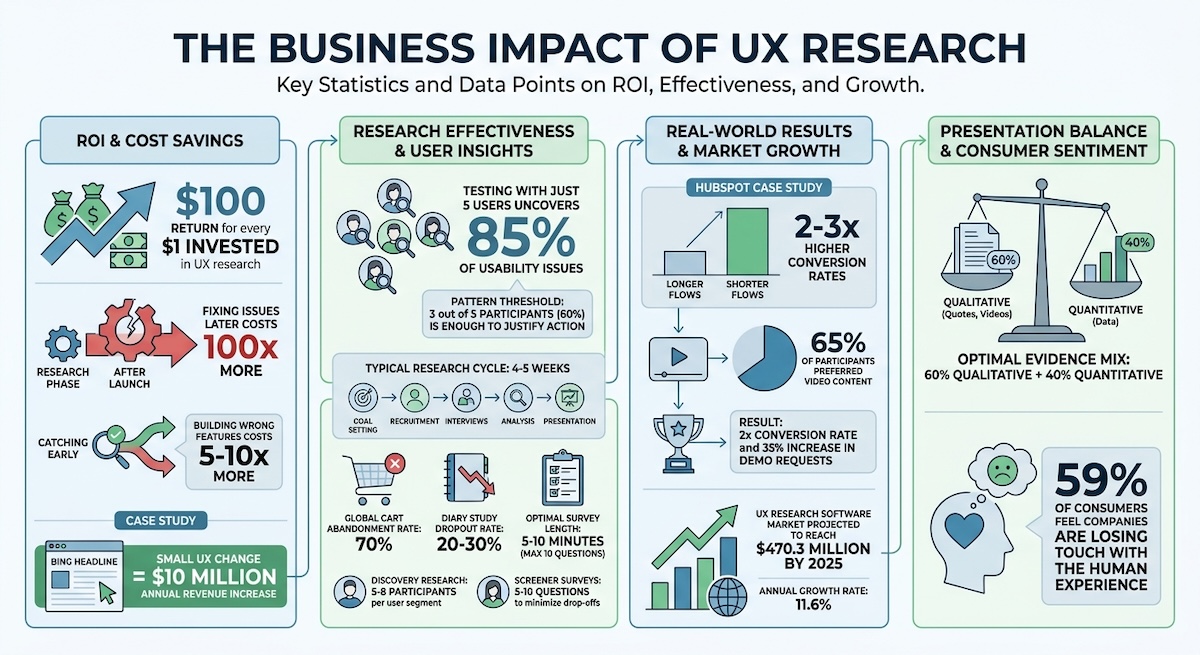
Every $1 spent on UX research can yield a $100 return, and fixing issues after launch costs up to 100 times more than catching them early. This guide covers the methods, tools, and analysis frameworks teams need to turn user behavior into better products and measurable business outcomes.
Article Summary
What is UX research and why does it matter?
UX research is the practice of understanding how users interact with products so teams can make better design decisions based on real behavior rather than assumptions. Every $1 invested in UX research can return $100, and fixing a problem after launch costs up to 100 times more than addressing it during the research phase.
What are the main types of UX research methods?
UX research methods fall into three categories: discovery methods like user interviews and contextual inquiry to understand user needs, testing methods like usability testing and card sorting to validate design decisions, and listening methods like surveys and analytics to measure real-world impact. Combining qualitative and quantitative approaches delivers the deepest insights.
How many participants do you need for UX research?
For usability testing, just 5 users can uncover approximately 85% of usability issues. For discovery research, aim for 5 to 8 participants per user segment. When recruiting, build a pool 30 to 50% larger than needed to account for no-shows.
How should UX research findings be analyzed and presented?
Start analyzing immediately after each session using affinity mapping to surface patterns organically. Prioritize findings using an impact and effort matrix, then present to stakeholders by leading with a compelling business outcome rather than methodology. A strong evidence mix is 60% qualitative and 40% quantitative.
What tools do UX research teams use?
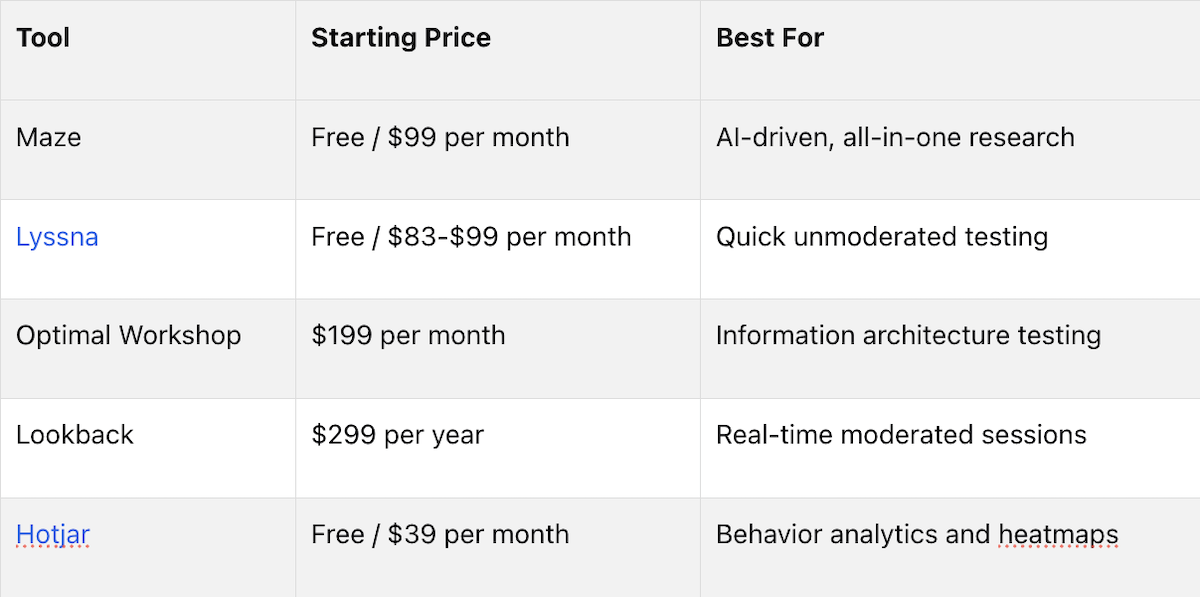
Leading UX research platforms include Maze for AI-driven prototype testing, Optimal Workshop for information architecture with access to over 10 million verified participants, Lookback for real-time moderated sessions, and Hotjar for behavior analytics and heatmaps. The right tool depends on research stage and team workflow.
User experience (UX) research is about understanding how users interact with products to make better design decisions. It focuses on real user needs, not assumptions, by collecting feedback and analyzing behavior. Here's why it matters:
Data-Driven Decisions: Avoid costly mistakes by testing ideas before development. For example, a small change in Bing's headline capitalization increased revenue by $10 million annually.
Cost Savings: Fixing issues during research costs far less than fixing them after launch - up to 100x cheaper.
High ROI: Every $1 spent on UX research can yield a $100 return.
UX research combines qualitative methods (interviews, observations) to understand "why" users behave a certain way and quantitative methods (surveys, analytics) to measure "what" and "how many." Teams that integrate UX research into their workflow create user-focused products, reduce wasted resources, and improve customer satisfaction.
Whether you're planning research, testing designs, or analyzing results, the key is to align research goals with business objectives and focus on actionable insights. The result? Better products, happier users, and measurable growth.
UX Research ROI and Impact Statistics
GUARANTEE Impact BEFORE You Start UX Research | Crash Course pt 2
Planning and Preparing for UX Research
Before diving into interviews or usability tests, teams must start with a clear and focused plan. This phase is critical because it determines whether the research will yield useful insights or just add noise. Teams should dedicate up to 90% of their planning time to crafting a clear problem statement - a concise sentence that zeroes in on the issue the research aims to address [6]. Without this clarity, there’s a risk of wasting weeks on poorly directed efforts that fail to deliver meaningful results.
Setting Research Goals and Questions
To ensure the research provides actionable insights, begin by defining 1–3 core research questions. A great way to approach this is by asking: "What would you want to know if you had a magic wand today?"[6]. This simple prompt can help sharpen the focus. Research goals should also tie back to key business metrics, such as Monthly Recurring Revenue (MRR) or Net Promoter Score (NPS), to show their value to stakeholders [3]. When framing questions, focus on understanding actual user behavior. For instance, instead of asking hypothetical questions like "Would you use...", ask about real experiences, such as "Tell me about the last time you..." This approach reveals what users actually do, not just what they think they might do [2].
Finding Stakeholders and Participants
Stakeholders typically fall into three categories: Leaders (department heads or VPs who set the direction), Implementers (designers and engineers who act on the findings), and Executives (C-suite members who control budgets) [3]. It's essential to interview stakeholders early on to understand their expectations and their definition of "success" [8][3].
When recruiting participants, focus on their behaviors rather than just demographic data. For example, instead of asking, "Do you use fitness apps?" try asking, "How many times per week do you open a fitness app?" This approach uncovers actual habits [7]. Keep screener surveys short - 5 to 10 questions - to minimize drop-offs [7][9]. Recruitment can be tricky, so plan for a participant pool 30%–50% larger than needed to account for no-shows [7]. Direct outreach, like personal invitations, often works better than passive methods like posting flyers.
Creating Timelines and Deliverables
A typical UX research cycle spans about 4–5 weeks and includes steps like goal setting, participant recruitment, conducting interviews, analysis, and presenting findings [10]. A timeline might look like this: project kickoff, plan review, recruiting, interviews, synthesis, and final presentation, all spread across those weeks [10]. Share approximate dates early to keep everyone aligned [10].
Design your analysis framework before collecting data to avoid feeling overwhelmed later [11]. Deliverables don’t have to be limited to traditional reports. Think creatively - use video clips, searchable research repositories, user personas, or lists of prioritized pain points [10][11][5]. And don’t forget to hold debrief sessions immediately after tests to capture emerging themes while they’re fresh. With a solid plan and clear schedule, your team will be ready to dive into the research and uncover valuable insights.
Core UX Research Methods for Teams
The research method you choose depends on the stage of your product lifecycle. Discovery methods help you understand the problem, testing methods validate your solutions, and listening methods assess the impact in real-world scenarios. Often, combining methods - like pairing analytics with interviews - can provide deeper insights, such as identifying and explaining drop-off points.
"Quantitative research tells you what your problem is. Qualitative research tells you why you have that problem." – Laura Klein, UX Researcher [1]
This balance between quantitative and qualitative research is essential at every stage.
Discovery Phase: Learning What Users Need
Before diving into development, user interviews can uncover motivations and frustrations. Focus on understanding past behavior by asking questions like, "Describe your most recent experience with..." rather than hypothetical ones like, "Would you use this feature?" To dig deeper, follow up with "Tell me more" multiple times, which helps uncover insights beyond surface-level responses.
Contextual inquiry, or field studies, involves observing users in their natural environments - whether at home, work, or elsewhere. This approach can reveal workarounds or environmental factors that might not come up in a lab setting. Another method, diary studies, involves having users document their interactions over several days or weeks. While these studies can provide valuable insights into habits and patterns, be prepared for a 20–30% dropout rate and recruit extra participants to compensate. For discovery research, aim for 5–8 participants per user segment.
Testing Phase: Checking Design Decisions
Once you've identified user needs, testing ensures your design meets those needs. Usability testing is a cornerstone of this phase. Observe users as they complete specific tasks with your prototype or product to identify where they struggle. Instead of giving step-by-step instructions like "Click the settings icon", set realistic goals such as "Set up a notification" to see if your design is intuitive. Surprisingly, testing with just 5 users can uncover about 85% of usability issues [2].
A real-world example: In 2013, a Microsoft Product Manager suggested an A/B test for a minor change to Bing's headline capitalization. Though engineers estimated it would take hundreds of hours to implement, the test revealed that the change could increase annual revenue by $10 million - a result no one had anticipated [2].
Card sorting is another useful method, helping teams create intuitive information architecture by asking users to group content in ways that make sense to them. Tree testing builds on this by using a text-only navigation hierarchy to confirm whether users can find what they need. Both methods are invaluable before committing to a full visual design.
In December 2023, HubSpot audited its conversion flows and found that shorter flows had conversion rates 2–3 times higher. User interviews also revealed that 65% of participants preferred video content. By simplifying the flow and prioritizing video, HubSpot doubled its conversion rate and saw a 35% increase in demo requests [4].
Listening Phase: Using Feedback
Listening methods close the loop by providing feedback that informs both discovery and testing. Surveys are a great way to collect large-scale quantitative data, often using metrics like Net Promoter Score (NPS) or Customer Satisfaction (CSAT). To avoid drop-offs, keep surveys short - no more than 10 questions - and ensure they take 5–10 minutes to complete, especially for mobile users.
Analytics provide a window into user behavior by tracking clicks, drop-offs, and time spent on pages. Heatmaps add another layer by visually highlighting areas of engagement and identifying "false affordances", or elements that look clickable but aren't. Pairing these insights with user feedback audits, such as analyzing support tickets, chat logs, and app store reviews, can help pinpoint recurring problems.
To stay in tune with user needs, establish a regular research rhythm - whether through weekly interviews or sprint tests. By continuously integrating these insights into your process, your product can better adapt to evolving user expectations.
Analyzing and Presenting UX Research Findings
Once you've gathered your data, the real work begins: turning raw observations into practical insights. Data collection is just the start - it's the analysis and application that drive meaningful decisions. To keep insights sharp and relevant, start analyzing immediately after each session. Discussing findings with your team while the details are fresh helps align understanding and reduces the risk of cognitive bias [12][5]. Delaying this step by days or weeks can drain both context and momentum.
A great way to identify patterns is through affinity mapping. Write each observation or user quote on a sticky note, then have your team silently group similar notes into clusters. This method allows patterns to emerge organically without dominant voices steering the process too early [13]. For smaller tests - like five user interviews - a pattern seen in three or more participants (60%) is often enough to justify action [13]. This "3/5 rule" ensures you can make decisions quickly and confidently.
Once patterns are clear, prioritize them by connecting user pain points to measurable business outcomes. For instance, if analytics show a high drop-off rate during checkout and interviews reveal confusion about shipping costs, you've identified both a quantitative issue and its qualitative root cause. Use an impact/effort matrix to sort recommendations into categories like "Quick Wins" (high impact, low effort), "Strategic" (high impact, high effort), or "Nice-to-have" [15].
When it's time to share findings with stakeholders, start with the conclusion. This ties back to the importance of setting clear research goals and ensuring every insight directly informs design decisions. Lead with a compelling insight or problem statement - such as "We're losing $500,000 annually because 40% of users abandon checkout" - rather than diving into your methods [14]. Tailor your presentation to your audience: executives might need a concise 6-slide deck focused on ROI, while product teams may require a more detailed 13-slide presentation with tactical insights and user quotes [14]. A good balance for presenting evidence is 60% qualitative (like user quotes and video clips) and 40% quantitative data. This mix builds both empathy and credibility [14].
"Your job isn't done when the research is done. It's done when the insights change what gets built." – CleverX Blog [14]
Frame your insights using this structure: "When [situation], users [behavior] because [motivation], which leads to [consequence]" [15]. After presenting, follow up within 24 hours with a summary email highlighting the top three insights, your recommendations, and a link to the full presentation to keep the momentum going [14]. Finally, store your findings in a tagged repository or on digital whiteboards so they're easy to access during future design sprints or roadmap discussions [5]. These steps ensure your insights remain actionable and ready to inform future decisions effectively.
Tools and Collaboration for UX Research
Tools for Planning and Running Research
The right tools can save time and improve the quality of insights in UX research. Many modern platforms streamline the process by handling participant recruitment, study execution, and data analysis in one place. These systems also connect you with verified participants who match your target audience.
For recruiting participants, some standout options include:
Optimal Workshop: Access to over 10 million verified participants across 150+ countries.
Maze: A panel of over 6 million pre-screened contributors.
Dscout: A "Scout" panel with more than 3 million verified participants.
"Where Dscout is unique is the quality of the participants we get and the ease of doing the type of research we need to do." – Brian Graziano, Director of User Experience at Dscout [17]
Choosing the right platform depends on your research needs. For example:
Optimal Workshop specializes in information architecture testing with tools like Treejack (tree testing) and OptimalSort (card sorting).
Maze is excellent for rapid prototype testing, offering seamless Figma integration.
Lookback provides a virtual observation room where stakeholders can watch live sessions, take timestamped notes, and discuss insights in real-time.
Investing in UX research pays off - companies report a return of $100 for every $1 spent [16].
Once you’ve selected the right tools, the next step is ensuring your team’s workflow is well-aligned.
How Research Teams Work Together
Beyond selecting tools, effective collaboration is essential for successful UX research. Teams need centralized spaces where everyone can access and share information easily, avoiding the chaos of scattered documents. Platforms like Miro provide a solution, offering an infinite digital canvas for tasks such as clustering sticky notes, creating journey maps, and linking research findings to design decisions.
"Miro works as a living knowledge base - visually capturing and sharing research findings across the team." – Philip McCusker, Product Manager at Munich Re [1]
The real challenge lies in bridging research insights with actionable steps. Integrating findings into project management tools like Jira or Trello ensures that research directly informs development tasks. When paired with communication tools like Slack, teams can stay updated with real-time alerts as studies wrap up or new trends emerge - boosting productivity by as much as 47% [18].
For teams working across time zones, asynchronous collaboration is key. Digital workspaces allow stakeholders to review findings and leave feedback at their convenience. Instead of lengthy debrief meetings, teams can share automated highlight reels or short video clips to quickly convey key insights.
"As a user researcher, my mission is to humanize data and spread impactful and memorable user stories, so we make products and services that matter to people." – Summer Kim, Head of User Research at WhatsApp [1]
Using Technology to Work Faster
Technology plays a big role in speeding up research. AI-powered tools are especially useful for automating repetitive tasks like transcription and identifying themes in data. Platforms like Maze and Dscout even feature AI moderators that can conduct interviews, tailoring follow-up questions based on participant responses [16].
"The ability to instantly create an entire study via a few simple prompts and a Figma prototype is a huge time saver for our team." – Michael Leo, PhD, Senior Design Research & Consumer Insights Lead [17]
AI also simplifies data synthesis. Hours of raw footage can be distilled into actionable insights by grouping qualitative data, summarizing interview threads, and creating highlight reels.
"The combination of both rapid and qualitative research with remote testing at scale and quantitative metrics provides statistical significance for stakeholders." – Martin Hicks, Senior Research Manager at Lloyd's Bank [19]
The UX research software market is on the rise, projected to hit $470.3 million by 2025, with an annual growth rate of 11.6% [20]. Advanced tools like Hubble MCP are pushing the boundaries by allowing teams to query insights across studies using natural language, making it easier than ever to extract relevant findings quickly.
Conclusion: Using UX Research to Grow Your Business
Key Takeaways for Teams
To get the most out of UX research, focus on three main practices: set clear goals during planning, work closely with your product trio (designers, engineers, and product managers), and turn insights into actionable steps. Watching research sessions as a team helps everyone stay on the same page and avoids the risk of misinterpreted or watered-down findings from secondhand reports [2].
The best teams treat research as an ongoing habit, not a one-off task. Instead of relying on large quarterly studies, aim for smaller, consistent efforts - like conducting one user interview a week or running a usability test each sprint. This steady rhythm ensures your product adapts to changing user needs without overwhelming your schedule [2].
For reliable insights, combine qualitative and quantitative research. Qualitative methods, like interviews, reveal why users face challenges, while quantitative data shows how many people are affected. As UX researcher Laura Klein puts it:
"Quantitative research tells you what your problem is. Qualitative research tells you why you have that problem" [1].
By following these strategies, teams can achieve measurable results, like cutting costs and boosting revenue.
How UX Research Pays Off Over Time
When implemented well, UX research delivers clear financial advantages. Fixing a problem after launch is 100 times more expensive than addressing it during the early research and design stages [3]. Similarly, building a feature that misses the mark costs 5–10 times more than catching the issue early through research [2]. Testing and validating ideas upfront saves money and ensures a better return on investment.
Consistent research leads to ongoing improvements that add up over time. For example, with global cart abandonment rates hovering around 70% [21], even small tweaks to reduce friction can drive meaningful revenue. Beyond financial gains, research keeps the focus on the human side of the experience - something 59% of consumers feel companies are losing touch with [1]. Sharing user stories and humanizing data helps create products that resonate with people and fuel long-term growth.
FAQs
Which UX research method should we use first?
User interviews are often the go-to starting point for UX research. This qualitative method helps teams dig into what users need and why they behave the way they do. By offering a closer look at user motivations, interviews lay the groundwork for deeper understanding. Plus, they make it easier to move on to other methods, such as surveys or usability testing, as the research progresses.
How many participants do we need for reliable results?
For qualitative UX research, around five participants is typically sufficient to uncover major insights and identify patterns. This number often allows researchers to reach a point of saturation, where new participants are unlikely to reveal significantly different findings. However, the ideal number can vary depending on factors like your method, research goals, and the specific context of the study.
On the other hand, quantitative studies often require a larger participant pool to achieve statistically reliable results and ensure accuracy.
How do we turn research findings into product changes fast?
To swiftly translate research findings into actionable product changes, begin by organizing and breaking down the data into clear, concise insights. Techniques such as coding, tagging, and creating affinity diagrams can help uncover patterns and prioritize next steps effectively. Incorporating AI-powered tools can speed up the analysis process and support informed decision-making. The key is to systematically distill your findings and directly apply them to design solutions, ensuring product updates are both efficient and impactful.
Key Points
What is UX research and how should teams plan for it?
UX research is the practice of studying real user behavior to inform better product and design decisions, replacing assumptions with evidence. Effective research begins with a focused plan, not a methodology.
Define 1 to 3 core research questions before selecting any method, dedicating up to 90% of planning time to crafting a clear problem statement
Tie research goals to business metrics like Monthly Recurring Revenue or Net Promoter Score to demonstrate value to stakeholders
Focus questions on real past behavior rather than hypotheticals, asking "Tell me about the last time you..." instead of "Would you use this feature?"
Recruit a participant pool 30 to 50% larger than needed to account for no-shows, and keep screener surveys to 5 to 10 questions to minimize drop-off
A typical UX research cycle spans 4 to 5 weeks, covering goal setting, recruitment, interviews, synthesis, and stakeholder presentation
What UX research methods should teams use at each stage of product development?
The right research method depends on where a product is in its lifecycle. Discovery, testing, and listening methods each serve a distinct purpose and are most effective when combined.
Discovery methods like user interviews and contextual inquiry reveal user motivations and environmental factors that lab settings miss, with 5 to 8 participants per user segment recommended
Usability testing with just 5 users uncovers approximately 85% of usability issues, and goals should be realistic rather than step-by-step instructional
Card sorting and tree testing help teams build intuitive information architecture before committing to visual design
Surveys and analytics provide large-scale quantitative data on behavior, while heatmaps identify false affordances and engagement patterns
Diary studies track user habits over days or weeks but carry a 20 to 30% dropout rate, requiring extra recruitment to compensate
How should UX research findings be analyzed and turned into actionable insights?
Raw observations only create value when they are systematically analyzed and connected to business outcomes. Speed and structure both matter in the analysis phase.
Begin analysis immediately after each session while details are fresh, using team debrief discussions to reduce cognitive bias
Use affinity mapping by writing observations on sticky notes and grouping them silently as a team, allowing patterns to emerge without dominant voices steering early conclusions
Apply the 3 out of 5 rule: a pattern seen in 3 or more participants during 5 user interviews is sufficient justification to act
Prioritize findings using an impact and effort matrix, categorizing recommendations as Quick Wins, Strategic initiatives, or Nice-to-haves
Frame insights using the structure: "When [situation], users [behavior] because [motivation], which leads to [consequence]" for maximum clarity and stakeholder alignment
How should UX research findings be presented to stakeholders?
Presenting research effectively is as important as conducting it well. Findings that fail to drive decisions have no real value regardless of their quality.
Lead with a compelling business outcome, such as "We are losing $500,000 annually because 40% of users abandon checkout," rather than opening with methodology
Tailor presentation depth to the audience: executives need a concise 6-slide deck focused on ROI, while product teams benefit from a detailed 13-slide presentation with tactical insights
Balance evidence at 60% qualitative and 40% quantitative, using user quotes and video clips alongside data to build both empathy and credibility
Follow up within 24 hours with a summary email covering the top 3 insights, recommendations, and a link to the full presentation
Store findings in a tagged repository or digital whiteboard so insights remain accessible during future design sprints and roadmap discussions
What tools do UX research teams rely on and how do they compare?
The right UX research platform depends on research stage, team size, and budget. Modern tools handle recruitment, execution, and analysis in increasingly integrated ways.
Maze starts free with paid plans from $99 per month, best for AI-driven all-in-one research with seamless Figma integration for rapid prototype testing
Optimal Workshop at $199 per month specializes in information architecture testing with access to over 10 million verified participants across 150 countries
Lookback at $299 per year provides a virtual observation room for real-time moderated sessions with live stakeholder viewing and timestamped notes
Hotjar starts free with plans from $39 per month, delivering behavior analytics and heatmaps that identify engagement patterns and false affordances
AI-powered features across platforms like Maze and Dscout now include AI moderators that conduct interviews and tailor follow-up questions based on participant responses in real time
How does UX research deliver measurable ROI and long-term business value?
UX research is not a cost center. When structured correctly it is one of the highest-return investments a product team can make, with compounding benefits across development cycles.
Every $1 invested in UX research returns approximately $100, making it one of the highest-ROI activities in product development
Fixing issues after launch costs up to 100 times more than addressing them during the research and design phase
A minor Bing headline capitalization change identified through A/B testing added $10 million in annual revenue, a result no one had anticipated before testing
HubSpot doubled its conversion rate and increased demo requests by 35% after UX research revealed a preference for video content and shorter conversion flows
With global cart abandonment rates around 70%, even small friction reductions driven by research can generate meaningful revenue gains at scale
Get Started
Streamline your online presence and captivate users with a refined, single or minimal page experience. Schedule a call with our team today to discuss how we can simplify your site and elevate your brand in just 30 days.