Optimizing FAQ Schema for AI-Driven Search
Using Conversational Language
AI-driven search engines are designed to process questions as people naturally phrase them. When creating FAQ schema, it's essential to write questions in the same way users would ask them during a voice search or in an AI chat. For example, instead of using overly technical language, go with something like, "How do I add FAQ schema?" This aligns with the natural language processing (NLP) frameworks that platforms like ChatGPT and Perplexity use to interpret content effectively [7].
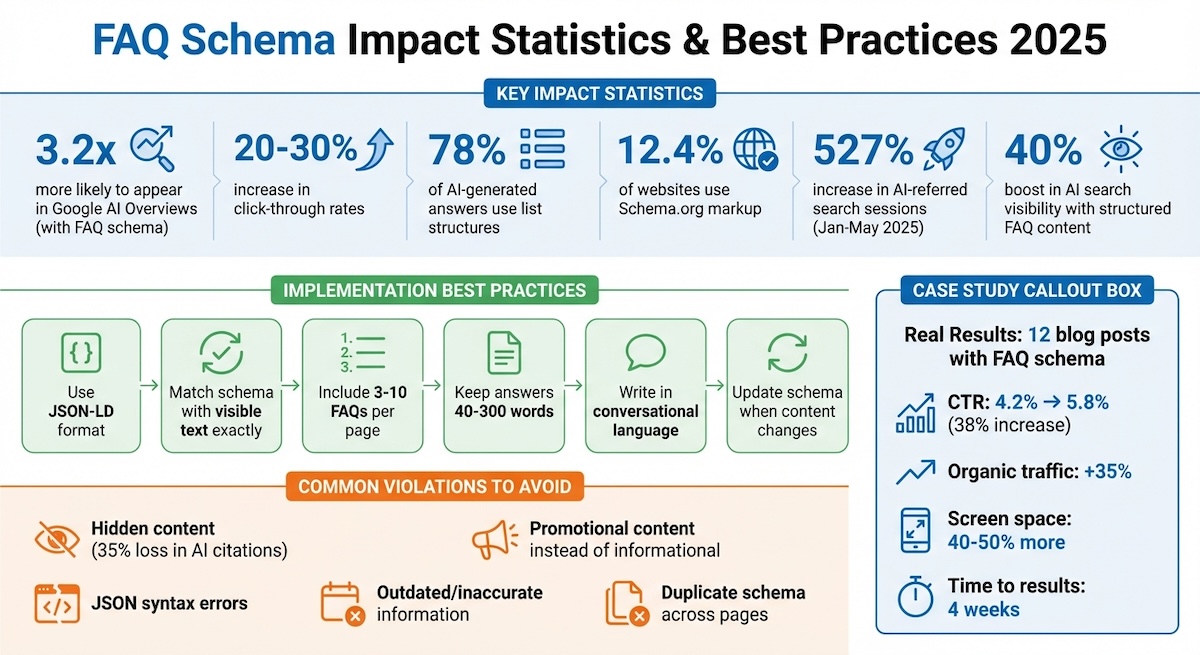
Why does this matter? Because AI-referred web sessions skyrocketed by 527% between January and May 2025 [18]. Voice assistants and AI tools prioritize content that matches longer, conversational queries. By adopting this natural tone in your FAQ schema, you make it easier for these algorithms to understand and cite your answers [18][7].
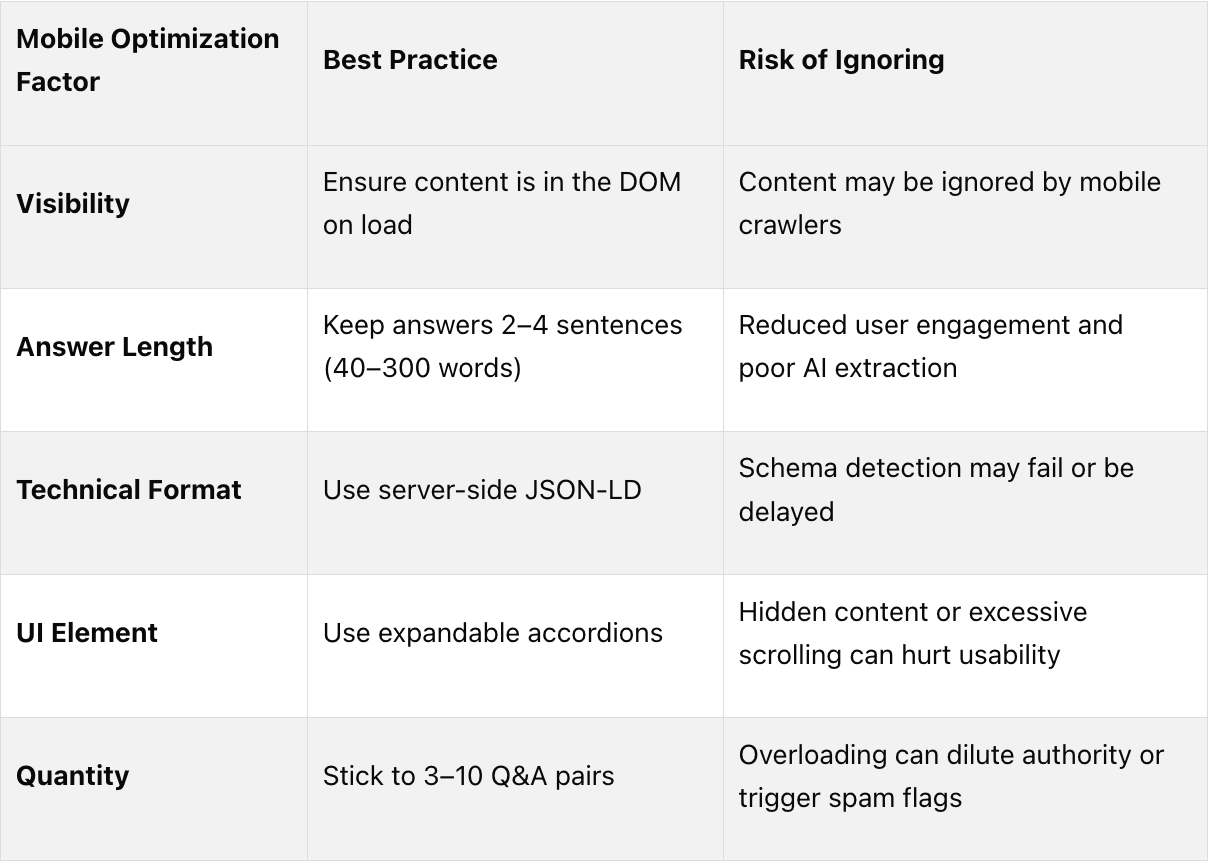
When crafting answers, aim for 40–60 words - this length strikes a balance between providing enough context and keeping it concise for AI to extract cleanly [18][8]. It's also important that each answer stands on its own, as AI platforms often pull individual Q&As without including the surrounding content. This approach not only helps with AI interpretation but also contributes to building credibility through E-E-A-T.
Demonstrating E-E-A-T in Answers
To gain favor with AI platforms, your content needs to reflect Experience, Expertise, Authoritativeness, and Trust (E-E-A-T). Use precise statistics and dates to add weight to your claims. For example, instead of saying something vague like, "FAQ schema improves click-through rates," be specific: "Adding FAQ schema to 12 blog posts increased CTR by 28% and boosted organic traffic by 35%." Details like these make your content more authoritative [4][18].
Different AI platforms have their own preferences. ChatGPT, for instance, leans toward neutral, authoritative content, which makes up 47.9% of its citations [18]. On the other hand, Perplexity favors conversational, experience-based answers with a tone that reflects community insights [6]. Google AI Overviews prioritize concise, direct responses that fit the format of featured snippets [18].
To strengthen your credibility, include authoritative source links in your answers. The FAQ schema text field supports HTML tags like <a>, <b>, <strong>, <ul>, and <li>, which you can use to make references clickable for AI engines [1][9]. Keep the tone neutral and educational - AI platforms tend to disregard schema that comes across as promotional [1][6]. By combining proper formatting with credible content, you increase the likelihood that AI platforms will extract and present your answers effectively.
Formatting Answers for AI and Featured Snippets
Good formatting plays a crucial role in getting your content featured in AI-generated responses. Adding FAQ schema can boost your chances of appearing in AI Overviews by approximately 40% for pages that already rank in the top 10 [6].
Since 78% of AI-generated answers include list formats [6], you should use HTML tags to create bulleted or numbered lists when appropriate. This makes your content easier for AI to parse and display, helping you achieve maximum clarity and precision in your FAQ schema.
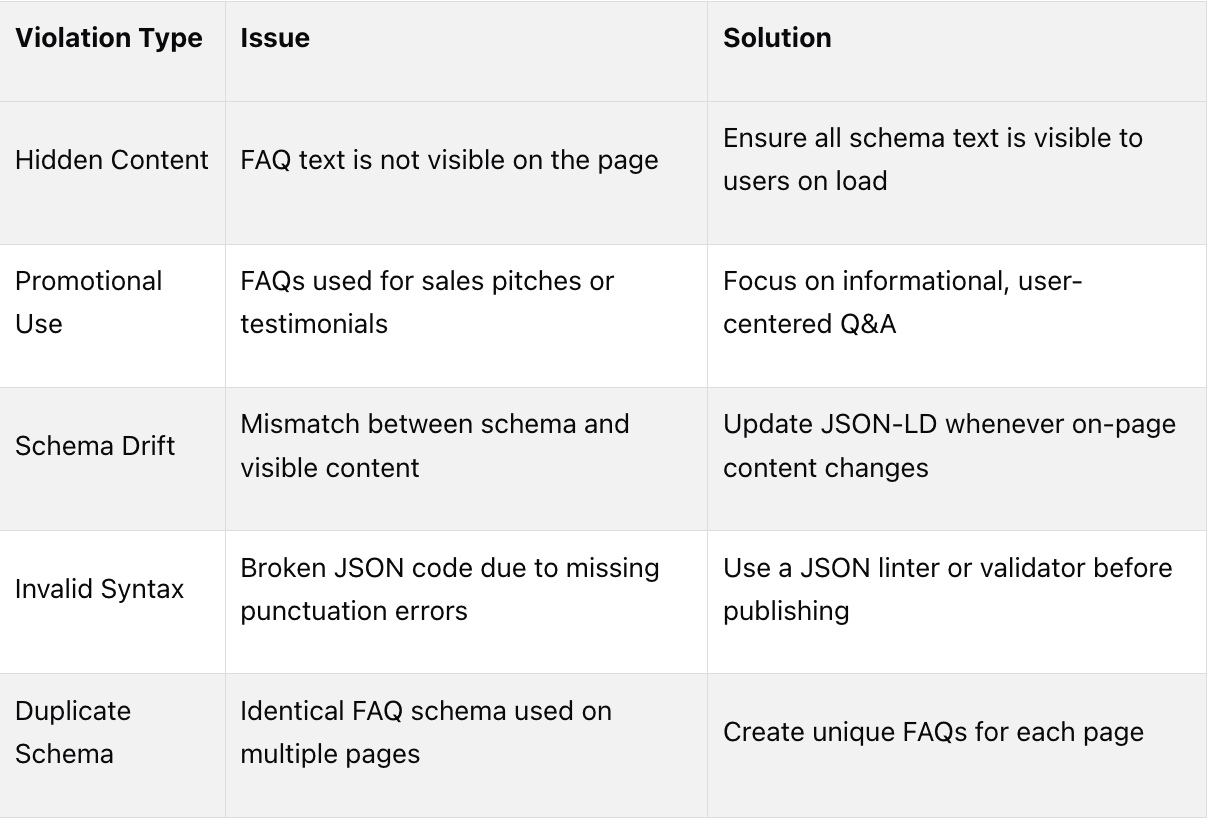
It's also vital to ensure that your JSON-LD markup matches the visible text on your page. Consistency between the name property in your schema and the H2 or H3 headings users see is critical for compliance [6]. As Shegun Otulana, Founder & CEO of Frase, explains:
"The schema that became less visible in Google's blue links became more valuable for generative search citations" [6].
While Google has limited traditional FAQ rich results to authoritative sources like government and health websites, AI search platforms continue to embrace FAQ schema from any high-quality source [5][6]. By focusing on clear formatting and credible content, you can position your site as a go-to resource for AI-driven search results.